Which Blackmagic Design DeckLink card fits your workflow?
The Blackmagic Design DeckLink series has long been a benchmark for professional video I/O in post and live production. Whether you work with DaVinci Resolve for grading, Adobe Premiere Pro for editing, or vMix for live streaming — the right card from Blackmagic (also known as BMD) delivers stable capture and accurate broadcast-quality playback.
This article walks you through choosing the right card step by step, so your system performs optimally and remains future-proof.
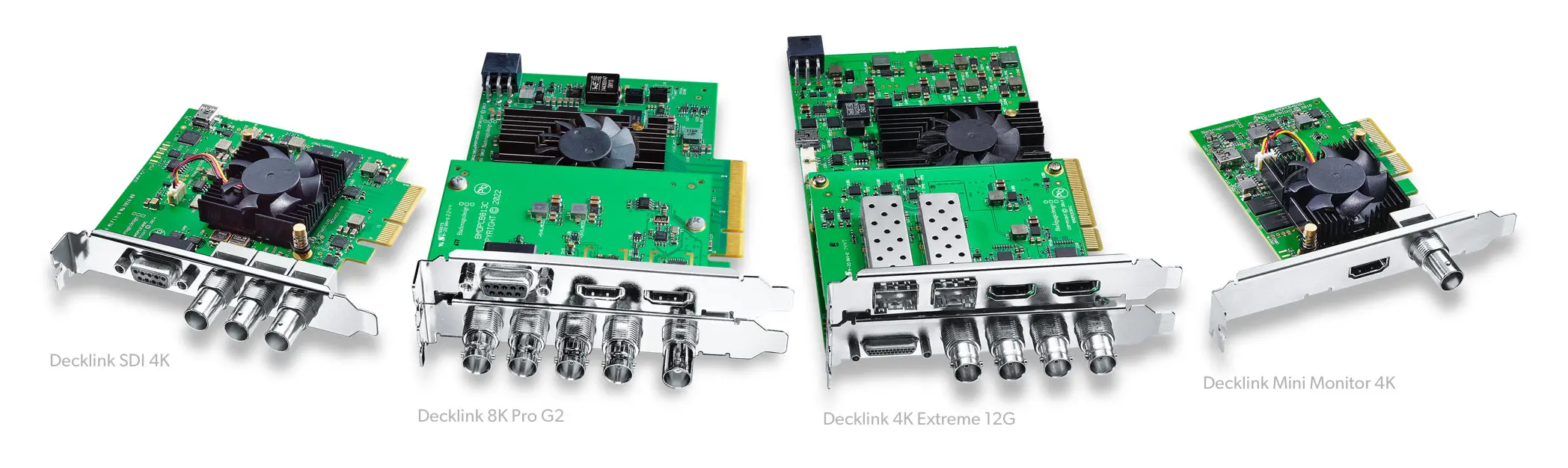
1. Check the available PCIe slots
DeckLink cards use the PCI Express (PCIe) interface. Carefully verify which slots your system has and their electrical (lane wiring) and mechanical (physical size) specifications.
- Mechanical vs electrical: a slot that’s physically x8 may be electrically x4. Effective bandwidth will then be limited.
- PCIe generations per model (guidelines):
- DeckLink Mini Monitor / Mini Recorder (HD & 4K) — runs on a PCIe Gen 2 x1 slot.
- DeckLink Duo 2 / Quad 2 — recommended PCIe Gen 2 x4 for multi-channel I/O.
- DeckLink Studio 4K / 4K Extreme — recommended PCIe Gen 3 x4 for sustained 4K bandwidth.
- DeckLink 8K Pro / 8K Pro Mini — require PCIe Gen 3 or Gen 4 x8 for full 12G-SDI performance (8K and/or multiple UHD channels).
- Backwards compatible: PCIe is backward/forward compatible; speed falls back to the lowest generation in the chain.
- Combining multiple cards: you can combine multiple DeckLink cards as long as sufficient free slots/lanes are available and your software supports multi-card operation.
Full-height or low-profile mounting
Many DeckLink cards from BMD ship with both full-height and low-profile brackets (extra PCIe shield included), so they fit compact (1U/2U) and standard chassis. Some models — such as the DeckLink 8K Pro Mini — are low-profile only.
2. Use via Thunderbolt expansion
Working with a laptop or compact workstation without internal PCIe slots? A Thunderbolt expansion chassis (e.g., Sonnet, OWC) lets you connect a PCIe card externally over TB3/TB4.
- Check the chassis compatibility; manufacturers publish lists of supported Blackmagic DeckLink models and any limitations.
- Bandwidth: Thunderbolt typically provides a single PCIe 3.0 x4 tunnel; sufficient for many workflows, but potentially tight with multiple concurrent 4K streams.
- Power: verify the chassis can supply enough power for your card.
3. Extra power and cooling
Some DeckLink cards (such as DeckLink 8K Pro or 4K Extreme 12G) require additional power (e.g., 6-pin). Check that your PSU or chassis can provide this. Also ensure adequate airflow; sustained 4K/8K workloads generate heat.
4. Choose the right type and number of video connections
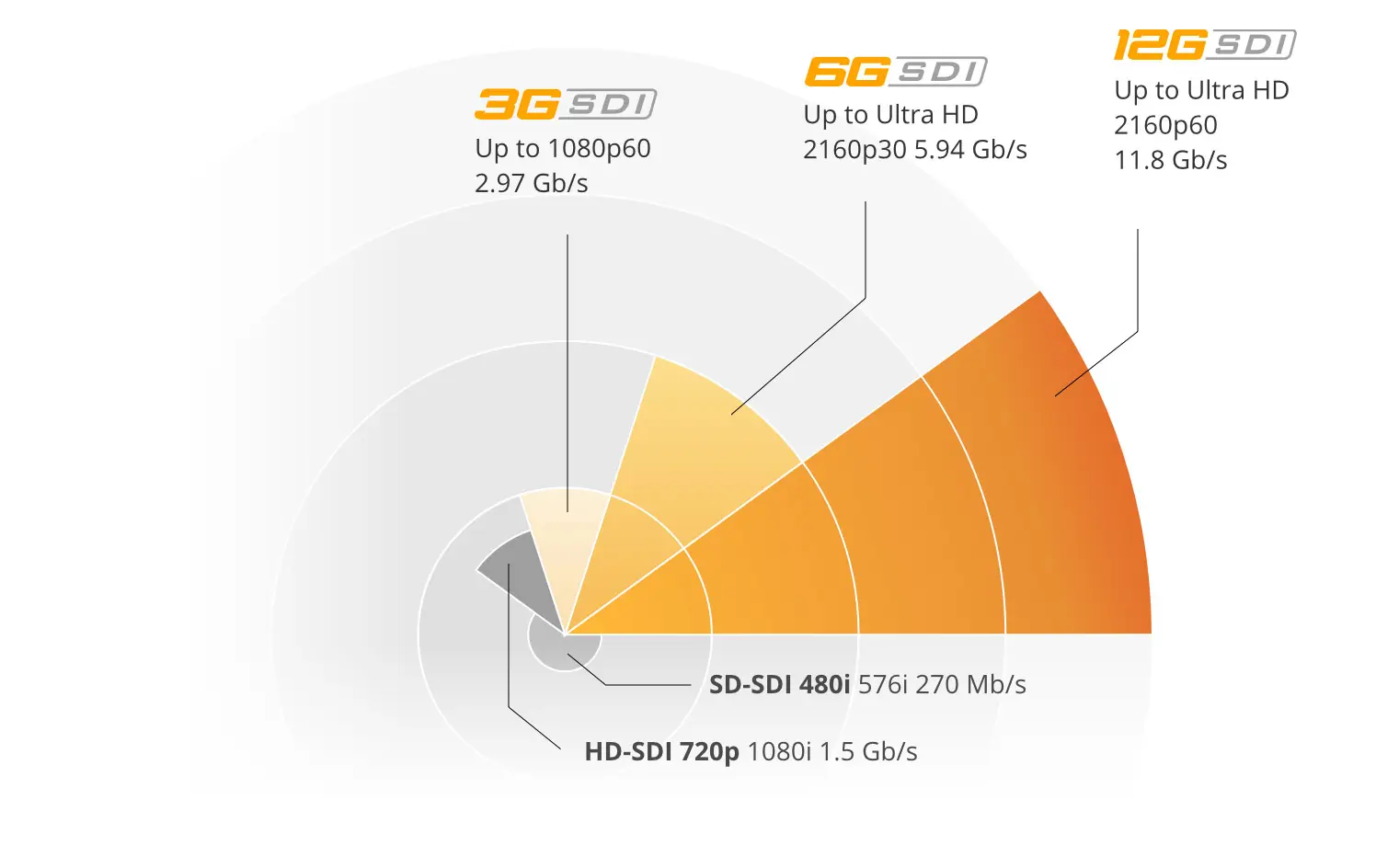
- SDI (3G/6G/12G): professional, low-noise connection; 12G-SDI supports up to 8Kp60 (card dependent).
- HDMI in/out: convenient for consumer cameras and monitors.
- Switchable ports: some ports can be configured as input or output (not both directions simultaneously).
- Concurrency: DeckLink Studio 4K offers multiple inputs but only one active input at a time (SDI or HDMI, etc.). DeckLink Quad 2 provides up to eight simultaneous I/O channels.
- Connector formats: compact or high-density models may use DIN 1.0/2.3 BNC or Micro BNC; plan for any required adapter cables/panels.
Cards with dual slot brackets
Several advanced Blackmagic Design cards (such as DeckLink Studio 4K and DeckLink 4K Extreme) use two slot brackets. The second bracket exposes extra connections (e.g., analog audio, timecode, RS-422). So in addition to the PCIe slot, reserve an extra free slot opening in your chassis.
5. DeckLink IP cards for SMPTE 2110 workflows
Migrating to IP? BMD offers DeckLink IP cards (e.g., DeckLink IP HD / IP 8K) that operate within a SMPTE 2110 ecosystem. Video, audio, and metadata then run over Ethernet instead of coax.
- Support for SMPTE 2110-10/20/30/40 (separate transport for timing, video, audio, and ancillary data).
- Multiple HD/UHD channels over 10G/25G Ethernet (model dependent) — ideal for modern studios and remote workflows.
- Important: requires a 2110-compatible setup: PTP clock (Precision Time Protocol), multicast-capable switches, and correct network configuration. Without this, Blackmagic IP cards will not perform properly.
6. Check software support
DeckLink cards only work with applications that support the Blackmagic DeckLink API. Examples: DaVinci Resolve, Adobe Premiere Pro, Avid Media Composer, vMix, OBS Studio (plug-in), Wirecast, and various ingest/automation tools. Always check your software version’s documentation for specific driver/OS combinations or 8/10-bit and RGB/YUV considerations.
7. Install the right drivers: Blackmagic Desktop Video
The Desktop Video suite from Blackmagic Design includes drivers, firmware, and utilities for Windows, macOS, and Linux. Always use the latest version and update firmware when prompted.
- Download: Blackmagic Design Support – Desktop Video
- Match the driver with your OS and client software (some NLEs require certified versions).
- Card not detected? Reinstall your NLE/live software. Many apps enable Blackmagic support only during installation when Desktop Video is already present.
8. Overview of popular DeckLink models (2025)
- DeckLink Mini Monitor HD — 3G-SDI & HDMI output, monitoring up to 1080p60 (PCIe Gen 2 x1).
- DeckLink Mini Monitor 4K — 6G-SDI/HDMI out, UHD 4Kp30 (PCIe Gen 2 x1).
- DeckLink Mini Recorder HD / 4K — SDI/HDMI input up to 1080p60 or 4Kp30 (PCIe Gen 2 x1).
- DeckLink Duo 2 — four independent 3G-SDI I/O channels, per-channel configurable (recommended PCIe Gen 2 x4).
- DeckLink Quad 2 — eight independent 3G-SDI channels, full-duplex (recommended PCIe Gen 2 x4).
- DeckLink Studio 4K (6G) — versatile: SDI, HDMI, analog A/V, timecode; one input active at a time (recommended PCIe Gen 3 x4).
- DeckLink 8K Pro G2 — four 12G-SDI ports, up to 8Kp60, HDR/12-bit/Rec.2020 (requires PCIe Gen 3/4 x8).
- DeckLink 8K Pro Mini — low-profile 8K variant designed for compact systems (requires PCIe Gen 3/4 x8; low-profile bracket only).
- DeckLink IP HD — SMPTE 2110 over 10G/25G Ethernet (requires 2110-compliant infrastructure).
9. Practical tips for a stable DeckLink setup
- Use quality cables (75 Ω SDI with low loss) and appropriate cable lengths.
- Ensure sufficient CPU/GPU headroom; encoding/decoding largely happens in software.
- Fix frame rates and resolutions in live workflows to avoid resampling.
- Use a fast (NVMe/RAID) disk set for recording to prevent dropped frames.
- For SMPTE 2110: configure PTP timing and multicast switching correctly before deployment.
Conclusion
Choosing the right Blackmagic DeckLink card depends on your application, PCIe generation/lanes, chassis (full-height/low-profile), any dual brackets, power/cooling, desired I/O (SDI/HDMI or IP), and software support. With the latest Desktop Video drivers from BMD, you’ll safeguard stability and compatibility.
Our product specialists are happy to help you choose the best Blackmagic Design solution for your workflow.
Frequently asked questions about Blackmagic / BMD DeckLink cards
What’s the difference between SDI- and IP-based DeckLink cards?
SDI cards use coax and fit traditional studio infrastructure. IP cards from Blackmagic follow SMPTE 2110 and transport video, audio, and metadata over Ethernet. They’re ideal for modern software-defined workflows, but require a 2110-compliant setup.
Does a DeckLink 8K Pro work in a PCIe Gen 3 slot?
Yes. The card works in Gen 3, but needs at least x8 lanes to achieve full 12G-SDI bandwidth. Gen 4 offers extra headroom, but the bottleneck is the lowest generation/lane configuration.
Can I use multiple DeckLink cards at the same time?
Yes, provided you have enough free slots/lanes and your software supports multi-card setups (e.g., DaVinci Resolve, vMix, Avid). Watch total PCIe bandwidth and cooling.
What’s the difference between full-height and low-profile DeckLink cards?
Many BMD models ship with both brackets. Some, such as the DeckLink 8K Pro Mini, are low-profile only. Check your chassis in advance.
Why do some DeckLink cards have two slot brackets?
To expose extra connections (e.g., analog audio, timecode, RS-422). Reserve an additional slot opening in your chassis alongside the PCIe slot.
Which software works with Blackmagic Design DeckLink cards?
Applications that support the DeckLink API, such as DaVinci Resolve, Adobe Premiere Pro, Avid Media Composer, OBS Studio (plug-in), Wirecast, and vMix. Check compatibility notes for your specific version.
What do I need for a SMPTE 2110 setup with DeckLink IP cards?
A PTP clock (Precision Time Protocol), multicast-capable switches, and correct network configuration. Without 2110 compliance, Blackmagic Design IP cards won’t function correctly.
Where can I download the Desktop Video drivers?
From the official Blackmagic site: Blackmagic Design Support – Desktop Video.
Products in this article
-
 Recommended Price 623.15 515.– Special Price 561.– 463.64
 -
 Recommended Price 1,566.95 1,295.– Special Price 1,412.– 1,166.94
 -
 Recommended Price 816.75 675.– Special Price 735.– 607.44
 -
 Recommended Price 744.15 615.– Special Price 670.– 553.72
 -
 Recommended Price 356.95 295.– Special Price 140.99 116.52