Blackmagic DaVinci Resolve Editor Keyboard
- SKU:
- 586466






Recommended accessories

Blackmagic DaVinci Resolve Editor Keyboard product description
Professional Speed with Two-Handed Editing
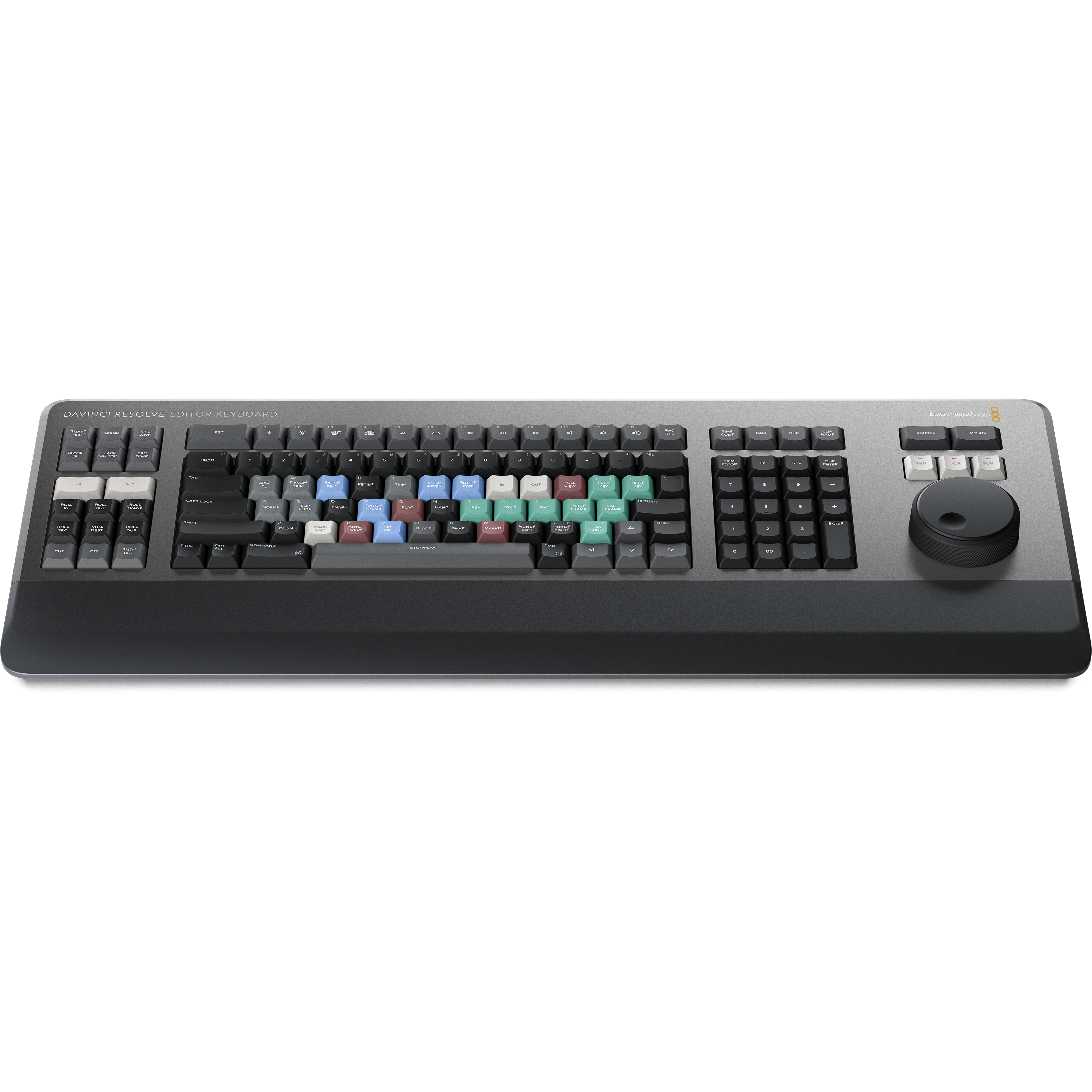
The Blackmagic Design DaVinci Resolve Editor Keyboard is engineered for professional editors who need to work faster and meet tight deadlines. Unlike a standard mouse-based workflow, this keyboard allows you to use both hands simultaneously. Your right hand controls the position in a clip via the integrated search dial, while your left hand sets in and out points and applies edits. This tactile approach makes the editing process dramatically faster and more intuitive.
Premium Metal Design and Durability
Built for the rigors of daily professional use, the keyboard features an all-metal chassis and a tiered key profile that allows you to navigate by feel. The high-quality key switches are the same type used in eSports, certified for over a million operations. For added comfort during long sessions, a soft-feel hand rest is included to reduce fatigue. The search dial is machined from solid metal, providing precise transport and trimming control with an integrated electronic clutch.
Revolutionary Source Tape and Search Dial
Traditional NLE workflows often involve tedious dragging and dropping of clips. The DaVinci Resolve Editor Keyboard introduces the Source Tape button, which instantly creates a continuous string of all clips in your bin. You can scroll through your entire media library as if it were a single tape. The search dial offers multiple modes: Jog for precise positioning, Shuttle for variable speed playback, and Scroll for fast navigation through long timelines.
Intelligent Keyboard Edit Modes
Dedicated edit buttons are positioned right above the in and out keys for lightning-fast execution. Features like Smart Insert, Ripple Overwrite, and Append to End allow you to perform complex edits without ever touching the mouse. The keyboard also includes a dedicated numeric keypad for direct timecode entry, featuring a double zero button and duration entry keys to streamline your post-production process.
Why buy Blackmagic Design at Vocas?
- Official BMD Dealer: Guaranteed authenticity and full manufacturer support.
- Large In-House Stock: Your gear is ready to ship without delays.
- 35+ Years of Expertise: Trusted advice from industry professionals.
- Dedicated Service Department: Professional in-house repairs and maintenance.
Specifications
Downloads
Frequently Asked Questions
People also bought
-
 Blackmagic DaVinci Resolve Micro PanelPortable hardware control panel for DaVinci Resolve featuring 3 high-res trackballs, 12 precision knobs, and 18 navigation keys. Includes Studio license.BackorderRecommended Price 894.19 739.– Special Price 802.– 662.81
 -
 Blackmagic DaVinci Resolve Mini PanelProfessional color grading panel with 3 trackballs, 12 primary knobs, and dual 5-inch LCDs. Includes DaVinci Resolve Studio license. Compact and powerful.BackorderRecommended Price 1,760.55 1,455.– Special Price 1,759.– 1,453.72
 -
 Blackmagic DaVinci Resolve Speed EditorAccelerate your workflow with the DaVinci Resolve Speed Editor. Includes a weighted search dial, Bluetooth, and a full DaVinci Resolve Studio license.BackorderRecommended Price 337.59 279.– Special Price 337.– 278.51
 -
 LogicKeyboard DaVinci Resolve - PC ASTRA 2 Backlit Keyboard (UK)Professional backlit UK keyboard for DaVinci Resolve on PC. Features color-coded shortcuts, USB 3.0 hub, and scissor-switch keys for faster video editing.Backorder169.28 139.90
 -
 Logickeyboard DaVinci Resolve - Mac ASTRA 2 Backlit Keyboard (UK)Professional backlit ASTRA 2 keyboard for DaVinci Resolve on Mac. Features UK layout, color-coded shortcuts, and integrated USB 3.0 hub for efficiency.BackorderRecommended Price 169.28 139.90 Special Price 152.– 125.62